Getting to know the Fluxor interface
What Fluxor is
Fluxor is a set of plugins for Revit, organized by discipline — the main focus today is Plumbing, with the Fluxor AI and Fluxor Viewer products under development. All commands live in their own Revit tab, without mixing into the standard ribbon.
The Fluxor tab in Revit
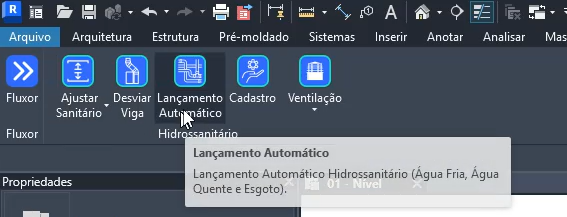
Once installed (see Installation and activation), a new Fluxor tab appears in the Revit ribbon, next to the standard tabs (Architecture, Structure, Systems…). Inside it, the commands are grouped into panels by discipline.

Panels and commands
The Plumbing panel holds the automatic routing commands, slope/elevation adjustments, venting and pipe bypass — the same ones covered in the tutorials of this Help Center. Hover over any icon to see a quick description of the command.
Video
Next steps
Ready to go? Start with the Automatic Plumbing Routing tutorial, or go back to the Help Center and pick the tutorial you need.